User Preference Study
Tapo Care Subscription
Page Preference Study
Seven executable design principles, based on Semantic Differential Scale
2026.05 · David Vieyra · Semantic Differential Scale · n=289 · Tapo Care
Why This Study
Prior to designing Tapo Care subscription page v1, the UX Research team conducted a Semantic Differential Scale study with 289 US users (dual-cohort design: V1 matrix n=253 + V2 inverse slider n=36), covering 7 pairs of visual and information architecture dimensions. This report centers on open-response analysis of user voices — quantitative ratings have limitations (users showed conflicting preferences across multiple dimensions, and single-direction % bars fail to capture nuance), but the quotes reveal users' genuine needs and the reasoning behind their preferences.
Principle
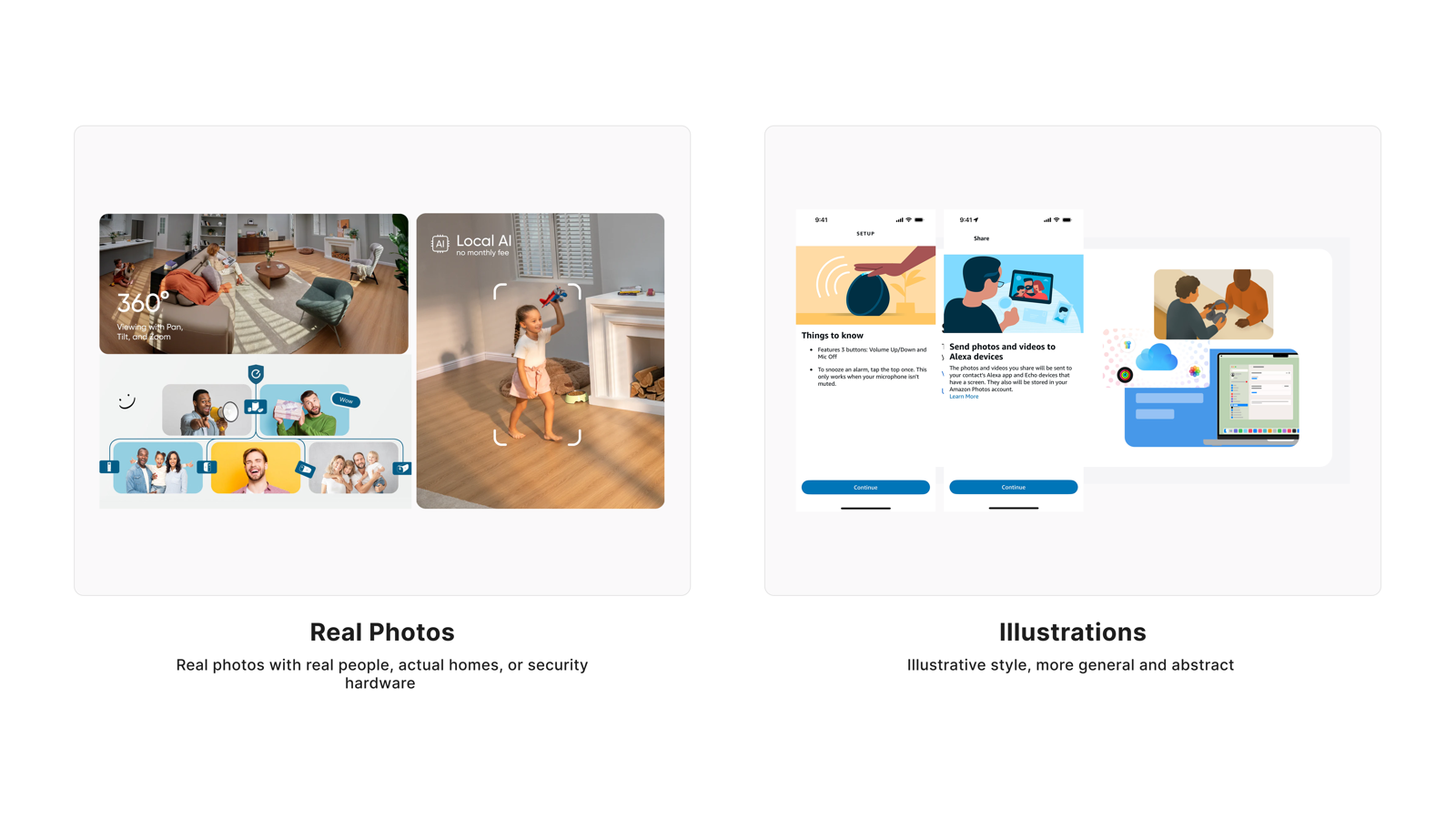
Use authentic home environment photography on the security subscription page. Avoid illustrations and AI-generated figures — realism is the foundation of trust, not an aesthetic preference.
Users' trust in a security product is built on authenticity. Most users explicitly stated that photos helped them assess whether the product was relevant to their own life. Opposition to real photos came primarily from privacy anxiety, not from an aesthetic preference for illustrations.
Quantitative Distribution
User Voices
"This makes the app feel more realistic and trustworthy, especially for a home security product."
Age 25–34Income $150,000+Sub $20–$29.99V2 cohort
"Real photos increase trust and help me make a perfect decision."
Age 35–44Income Over $100,000Sub $20–$29.99V2 cohort
"Real photos are important to me. It gives me a better visual of what is happening."
Age 35–44Income $75,000–$99,999V1 cohort
"Real photos make me visualize a realistic scenario of how the product would be used and whether it would be useful for me."
Age 25–34Income Under $25,000V1 cohort
"Illustrations best because it makes me not think about the camera recording me as well."
Age 25–34Income $75,000–$99,999V1 cohort
"I prefer illustrations because I don't want to imagine someone else's family."
Age 18–24Income $50,000–$74,999V1 cohort
"Never use AI people who are supposed to 'look realistic' — either direction, keep the style honest."
Age 45–54Income Over $100,000V1 cohort
"Real photos risk feeling like stock imagery; illustrations feel more intentionally designed."
Age 18–24Income Less than $25,000Sub $20–$29.99V2 cohort
Visual Stimulus
User Perspective
Why users prefer Real Photos
- Makes the product feel credible and authentic — critical for a security context where trust is the primary purchase driver
- Helps users assess whether the product fits their own home, lowering the decision barrier
- More intuitive than illustrations — users can see actual installation states
- Creates an immediate connection between user and product, supporting subscription intent
Why users dislike Real Photos
- Viewing someone else's home creates psychological distance rather than relatability
- Triggers privacy anxiety — a reminder that cameras record the user too
- AI-generated "realistic" figures feel dishonest and can damage rather than build trust
- Low-quality stock photography underperforms relative to intentionally designed illustrations
Researcher's Synthesis
Consistency across cohorts: Both cohorts show a strong, consistent preference for Real Photos over Illustrations.
Key Finding: Participants overwhelmingly prefer real photos for security and subscription products. Real photos make the product feel more realistic, relatable, trustworthy, authentic, and premium. They help users visualize the product in their own homes and feel more confident in their purchasing decision. Illustration supporters are a clear minority, with some preferring them to avoid distraction or because they find models unsettling.
Minor difference: Cohort 1's quantitative scale showed a moderate preference for Illustrations (55%), while Cohort 2's slider showed a strong preference for Real Photos (67%). The slider format likely reduced hypothetical bias, revealing the true preference. Which is consistently reflected in the qualitative comments across both cohorts.
Takeaway: Security interfaces should prioritize authentic, realistic imagery over illustrated or stylized alternatives. Real photos build trust and credibility which are critical factors when users are making decisions about personal safety and home protection.
Tapo Care's Design Response
- Use authentic home environment product photography on the subscription page, showing devices in real installation contexts
- Avoid real human faces or identifiable family members in photos — convey safety through spaces and devices themselves
- Ensure image quality is high enough to distinguish product details; brand perception should convey security, reliability, and authenticity
- Avoid stylized illustrations or AI-generated "realistic figures" as primary visuals
- Photography should visually reinforce benefit descriptions, not serve as decorative background
Quant support: V1 matrix (n=254) favored Illustrations 52.8% / Real Photos 35.4%; V2 inverse slider (n=38) reversed significantly: Real Photos 65.8% / Illustrations 26.3%. The V1 vs V2 delta is substantial — one of 6 dimensions showing preference reversal — indicating V1 was influenced by hypothetical bias. V2 conclusion is the operative finding.
Principle
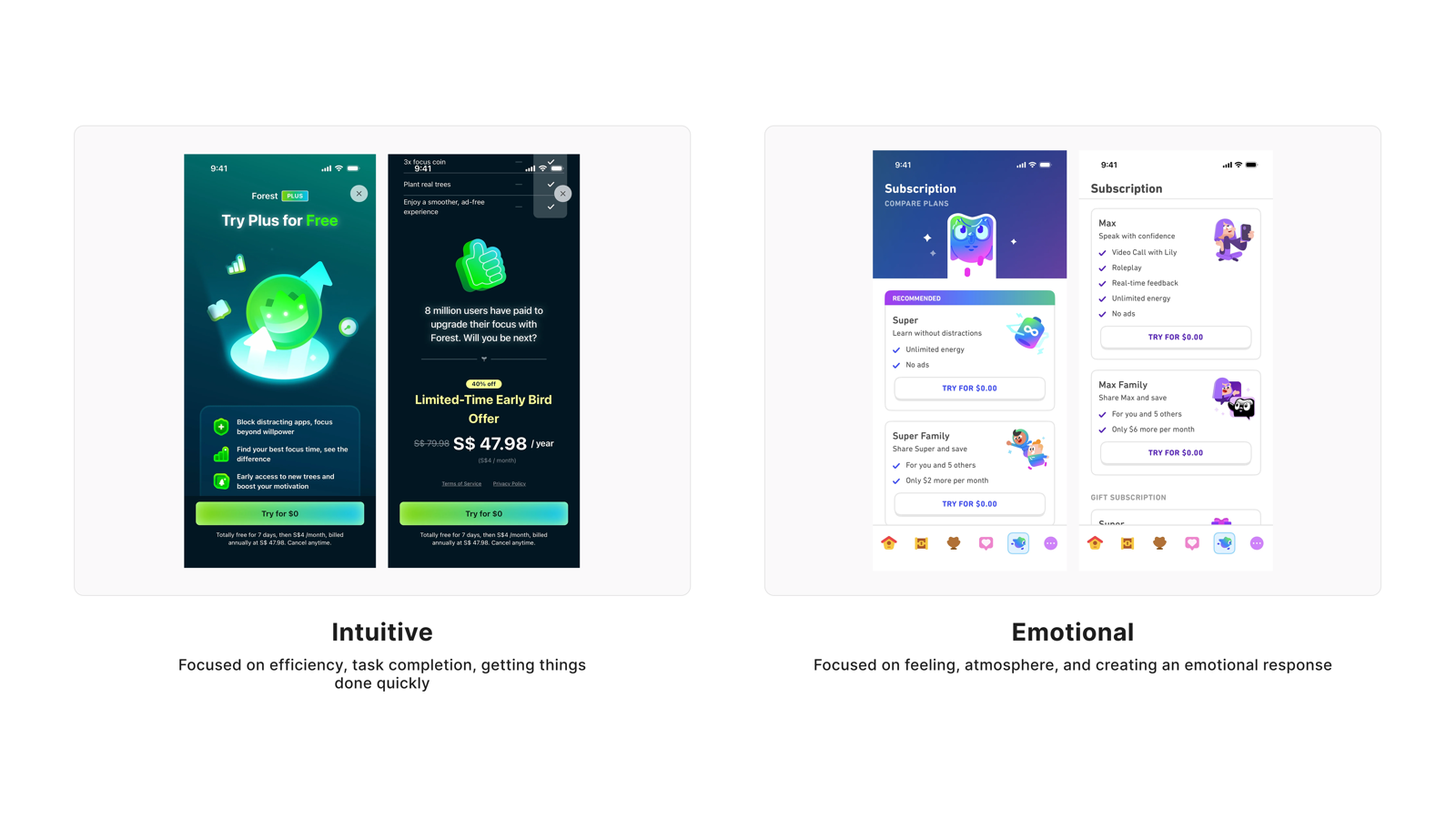
The subscription page's job is to help users decide — not to convince them that security matters. They already know. They don't need emotional language pushing them along.
Most users explicitly rejected emotional design, equating it with being manipulated. The minority who preferred emotional design, when read closely, were describing "scenario immersion" — not fear-based language.
Quantitative Distribution
User Voices
"Intuition always because I want to get things done. I don't need any sugar coating."
Age 25–34Income $50,000–$74,999Sub $20–$29.99V1 cohort
"I am busy — I want it quick and intuitive to understand."
Age 35–44Income Over $100,000Sub Under $10V1 cohort
"Again, better looking and smarter because we don't need to be convinced that security is important."
Age 45–54Income $25,000–$49,999Sub $10–$19.99V1 cohort
"Intuitive is better because I want to feel like I accomplished something rather than feeling something from the UI."
Age 25–34Income $25,000–$49,999V1 cohort
"It feels easier to navigate and makes it quicker to understand the subscription and take action."
Age 25–34Income $150,000+Sub $20–$29.99V2 cohort
"I am goal oriented. When you focus on tasks and goals, it is more relevant to me."
Age 35–44Income $75,000–$99,999Sub $10–$19.99V1 cohort
"I think this one heavily depends on the person but emotionally-centered works way better for me — it connects with why I want security."
Age 18–24Income Over $100,000V1 cohort
"I prefer a more intuitive design because it makes it quick and easy to understand the plan and take action."
Age 25–34Income $50,000–$74,999V1 cohort
Visual Stimulus
User Perspective
Why users prefer Intuitive design
- They arrive at the subscription page to complete a task, not to receive emotional guidance
- They already understand the importance of security — they don't need to be persuaded again
- Clear navigation is itself persuasive; efficiency builds trust
Why users dislike Emotional design
- Feels manipulative — like being pushed into a decision rather than making one autonomously
- Emotional copy often obscures information, leaving users unsure how to act
- Fear-based language in a security context backfires, making users question brand motives
Researcher's Synthesis
Consistency across cohorts: Both cohorts show a strong, consistent preference for Intuitive over Emotional.
Key Finding: Users overwhelmingly prefer intuitive, functional, and efficient designs over emotional appeals for security and subscription products. Intuitive designs are valued for being easier to navigate, faster to understand, and more logical in flow. Emotional appeals are actively rejected by many as manipulative, aggressive, or inappropriate. With specific criticisms including "fear mongering" and "I don't want an app to pretend to have emotions."
Minor difference: Cohort 1's quantitative scale showed a slight Emotional preference (54%), while Cohort 2's slider showed a strong Intuitive preference (70%). The slider format may have reduced hypothetical bias, revealing the true preference. The qualitative comments across both cohorts, however, were unanimously clear: Intuitive wins.
Takeaway: Security and subscription products should prioritize intuitive usability over emotional connection. Emotional appeals risk backfiring, reading as inauthentic or pressuring. Users want efficiency, directness, and logical flow - not feelings.
Tapo Care's Design Response
- Information hierarchy is clear — users can locate plan comparison and key pricing within 5 seconds
- Copy directly describes benefits; no fear or anxiety language (e.g., "your home is at risk")
- Subscription and cancellation paths are transparent; avoid hidden interactions or forcing users to scroll to see complete information
- Avoid manufactured urgency through exaggerated threat scenarios; frame around "what you can do" rather than "what happens if you don't subscribe"
Quant support: V1 matrix (n=254) favored Emotional 53.5% / Intuitive 35.0%; V2 inverse slider (n=38) reversed dramatically: Intuitive 68.4% / Emotional 15.8%. This is the strongest V1 vs V2 reversal of all 7 dimensions — preference direction nearly completely inverted. V2 + qualitative double alignment is the operative finding.
Principle
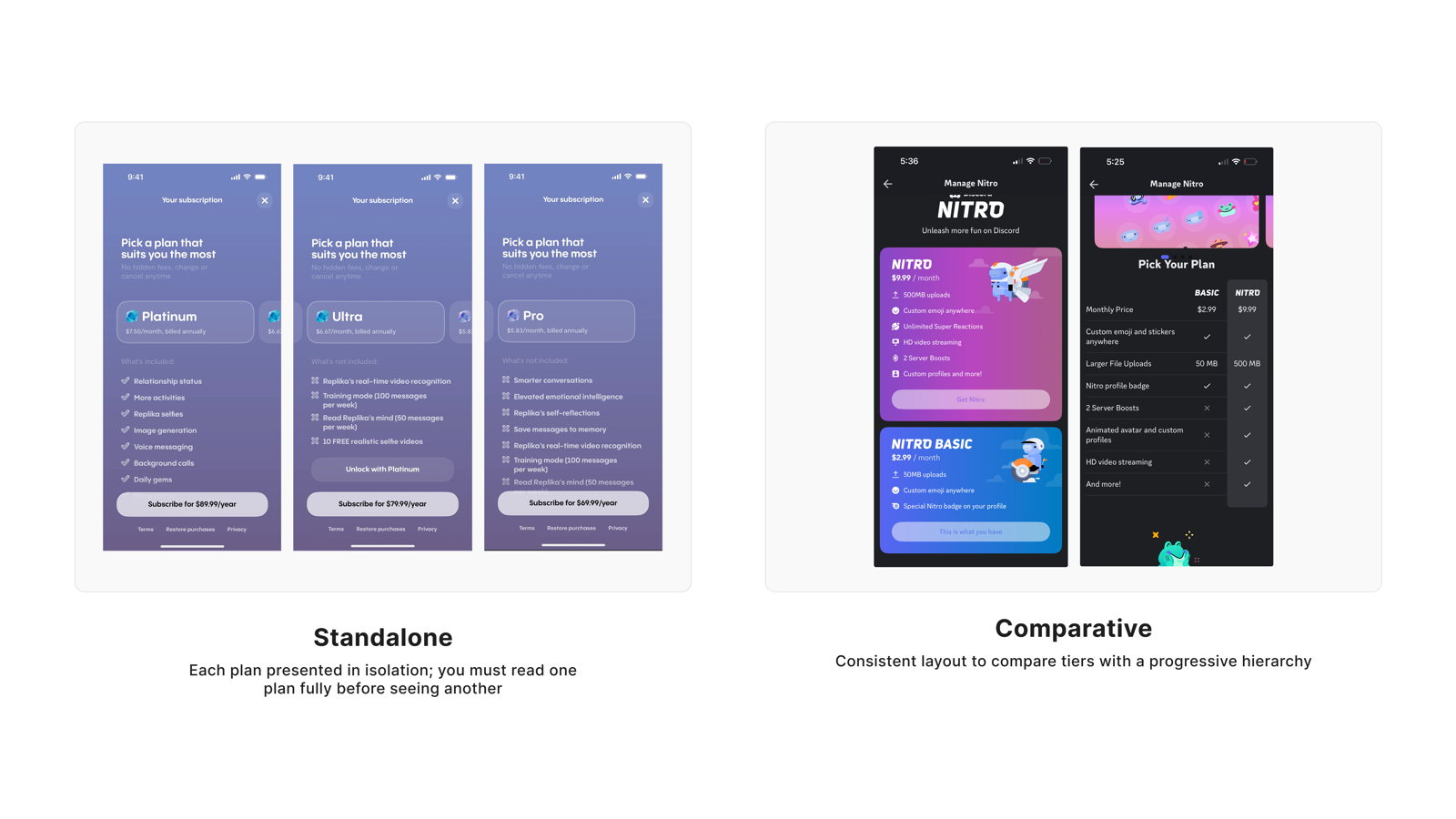
Present subscription plans side by side by default, so users can grasp differences at a glance — navigating back and forth is not just inconvenient, it makes users feel the system is deliberately hiding information.
This is the strongest consensus across all 7 dimensions. Users' demand for side-by-side comparison stems from decision efficiency, not visual preference — they know they need to compare, and back-and-forth navigation interrupts that judgment process.
Quantitative Distribution
User Voices
"It will enable me compare the both layout at once without going back and forth."
Age 25–34Income $75,000–$99,999Sub $20–$29.99V2 cohort
"Having all options at once to compare helps make a decision better. Having to go back and forth is too much of a hassle."
Age 25–34Income $25,000–$49,999V1 cohort
"I like the comparative one as I can quickly scan and see the tiers available."
Age 45–54Income $50,000–$74,999Sub Under $10V1 cohort
"I really liked the comparative layout because it makes it easy to compare plans side-by-side and understand the differences."
Age 25–34Income $50,000–$74,999V1 cohort
"I want to see all my options right up front with a way to easily compare them. Standalone feels time-wasting and unnecessary."
Age 18–24Income Over $100,000V1 cohort
"It makes noticing the difference easier and helps me make a more informed decision."
Age 35–44Income $50,000–$74,999V1 cohort
"I would go with comparative because it makes it easier to compare the different plans side by side and quickly see the differences."
Age 25–34Income Over $100,000Sub $20–$29.99V2 cohort
"The standalone design allows each plan to be viewed individually, giving users the space to read and consider each option before deciding."
Age 35–44Income Over $100,000V1 cohort
Visual Stimulus
User Perspective
Why users prefer Comparative layout
- All tiers visible on one screen — high scan efficiency
- Differences are immediately apparent without relying on memory
- Back-and-forth navigation interrupts the decision flow and creates suspicion that information is being hidden
Why users prefer Standalone layout
- Each plan has sufficient space for deeper presentation without crowding
- Allows focus on one plan without distraction from other options
- Information hierarchy feels clearer — stronger sense of understanding each item in sequence
Researcher's Synthesis
Consistency across cohorts: Both cohorts show a strong, consistent preference for comparative layout over standalone.
Key Finding: Participants overwhelmingly prefer side-by-side comparison formats for evaluating subscription plans. The comparative layout reduces cognitive load by eliminating the need to remember information across screens, enables faster decision-making, and clearly shows what is included or excluded. A small minority prefers standalone for its focused, less cluttered presentation, but the consensus across both cohorts is clear: users want to see options together, not separately.
Minor difference: Cohort 1 more explicitly noted that standalone reduces "pressure to decide," while Cohort 2 more heavily emphasized efficiency and visual appeal. The core preference for comparative remains unchanged."
Takeaway: Subscription plan selection interfaces should use side-by-side comparative layouts as the default. Standalone layouts may be offered as an alternative for users who prefer focused review, but the primary experience should support simultaneous comparison.
Tapo Care's Design Response
- Subscription plans are displayed side by side by default, with feature differences visible on the same screen
- Clearly mark inclusions and exclusions for each plan, with differentiation points prominently highlighted
- Recommended plan is guided through visual hierarchy rather than forced modals — user agency is preserved
- Comparison table maintains adequate row spacing and white space to avoid information density overload
- Consider offering a "single-plan focus" view as a secondary entry point, but do not use it as the default
Quant support: V1 matrix (n=254) favored Comparative 72.0% / Standalone 20.1%; V2 inverse slider (n=38) favored Comparative 60.5% / Standalone 36.8%. The most directionally stable of all 7 dimensions — V1 and V2 align, with consistent preference for Comparative across all age groups, income levels, and subscription tiers. No significant cohort variation.
Principle
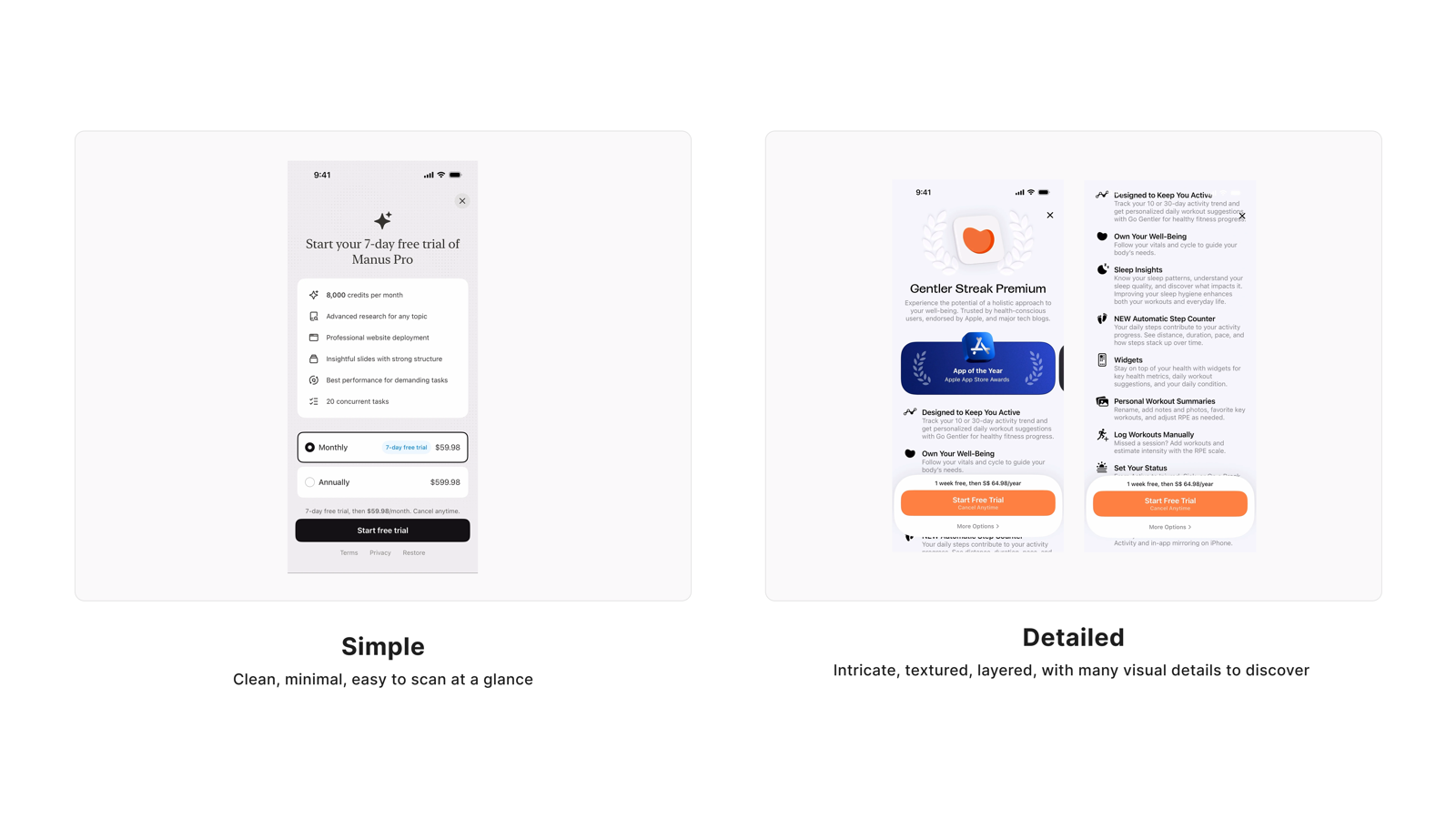
Users don't want less information — they want it available when they're ready for it. Progressive disclosure is the answer that satisfies users on both ends of the spectrum.
This dimension is the core evidence for the meta-insight. Users on both ends have compelling reasons: the simple version avoids information overload, while the detailed version provides trust signals and decision support. Quantitative data shows the largest V1/V2 reversal — but qualitative data reveals the truth: the question isn't which side to choose, but how to design the information hierarchy.
Quantitative Distribution
User Voices
"The more words actually turned me off, and I end up reading none of it."
Age 25–34Income $150,000+Sub $10–$19.99V2 cohort
"The simple version is easier to read. The detail version is very congested with information."
Age 45–54Income $50,000–$74,999Sub $20–$29.99V1 cohort
"I like details to be available if needed, but when taking quick glances I would prefer the basics."
Age 45–54Income Over $100,000V1 cohort
"For at-a-glance information I prefer simple, but for more explanation I would want detailed — it just depends on the situation."
Age 25–34Income $150,000+Sub $40+V1 cohort
"Having it more detailed makes me believe it is more legit / worth my money."
Age 18–24Income $50,000–$74,999Sub $10–$19.99V1 cohort
"A detailed information helps me make my decisions faster."
Age 25–34Income $25,000–$49,999V1 cohort
"I prefer the detailed one as it clearly shows you what you're paying for."
Age 35–44Income Over $100,000V1 cohort
"I prefer things to be easy to glance and find than having to read and get more confused."
Age 25–34Income Under $25,000Sub $10–$19.99V1 cohort
Visual Stimulus
User Perspective
Users who prefer Simple value
- Scan efficiency — capturing key information at a glance
- Information overload directly triggers avoidance; more words means nothing gets read
- Don't want to be bombarded with information before deciding whether they're interested
- (More common among ages 25–34, habitual fast-scanners)
Users who prefer Detailed value
- Knowing what they're buying — more transparency equals more trust
- Detail is a trust signal that actually helps them decide faster
- Need complete information to feel confident enough to subscribe
- (More common among ages 35+, users who need more context to form a judgment)
Researcher's Synthesis
Consistency across cohorts: Both cohorts show a clear qualitative preference for simplicity over detail, despite quantitative differences.
Key Finding: Participants consistently prefer simple, scannable information that is efficient and not overwhelming. Dense text creates friction, cognitive load, and disengagement. While detailed descriptions are valued for informed decision-making, the default preference across both cohorts is for clarity, ease of use, and quick overviews. This is especially trie for subscription and security products.
Minor difference: Cohort 1 (matrix) showed a slightly stronger expressed appreciation for detail in comments, whereas Cohort 2 (slider) more uniformly rejected text-heavy presentations as "overwhelming" or "boring."
Takeaway: Subscription and security interfaces should prioritize simplicity and scannability. Detailed information should be available but not presented as the default. Use progressive disclosure to keep the primary experience clean and efficient.
Tapo Care's Design Response
- Above-the-fold content uses concise benefit cards — scannable text, no paragraph-style explanations
- Provide "Learn more" or expandable entry points, letting users who need detail access it proactively
- Benefit items use short phrases, prioritizing keywords over complete sentences
- Expanded detail sections maintain clear information hierarchy and don't compete with the main flow for visual attention
- 35+ user path: ensure detail entry points are prominent enough that users don't need to "guess" whether more information exists
Quant support: V1 matrix (n=254) favored Detailed 68.5% / Simple 24.8%; V2 inverse slider (n=38) reversed: Simple 55.3% / Detailed 36.8%. Significant age effect: 35+ favored Detailed 74.7% vs <35 only 59.0% (15.7pp gap) — strong evidence supporting a progressive disclosure strategy.
Principle
Feature lists and scenario examples are both answering the same question — "what am I getting?" They are not competing formats; they are different entry points into the same user need.
V2 data is an exact 50/50 split — not because users have no preference, but because the user population contains two distinct groups, each building their judgment through a different path. The age difference is significant: users 35+ skew toward Scenario, those under 35 skew toward Feature. The design answer is to include both, using information hierarchy to let each user follow their own path deeper.
Quantitative Distribution
User Voices
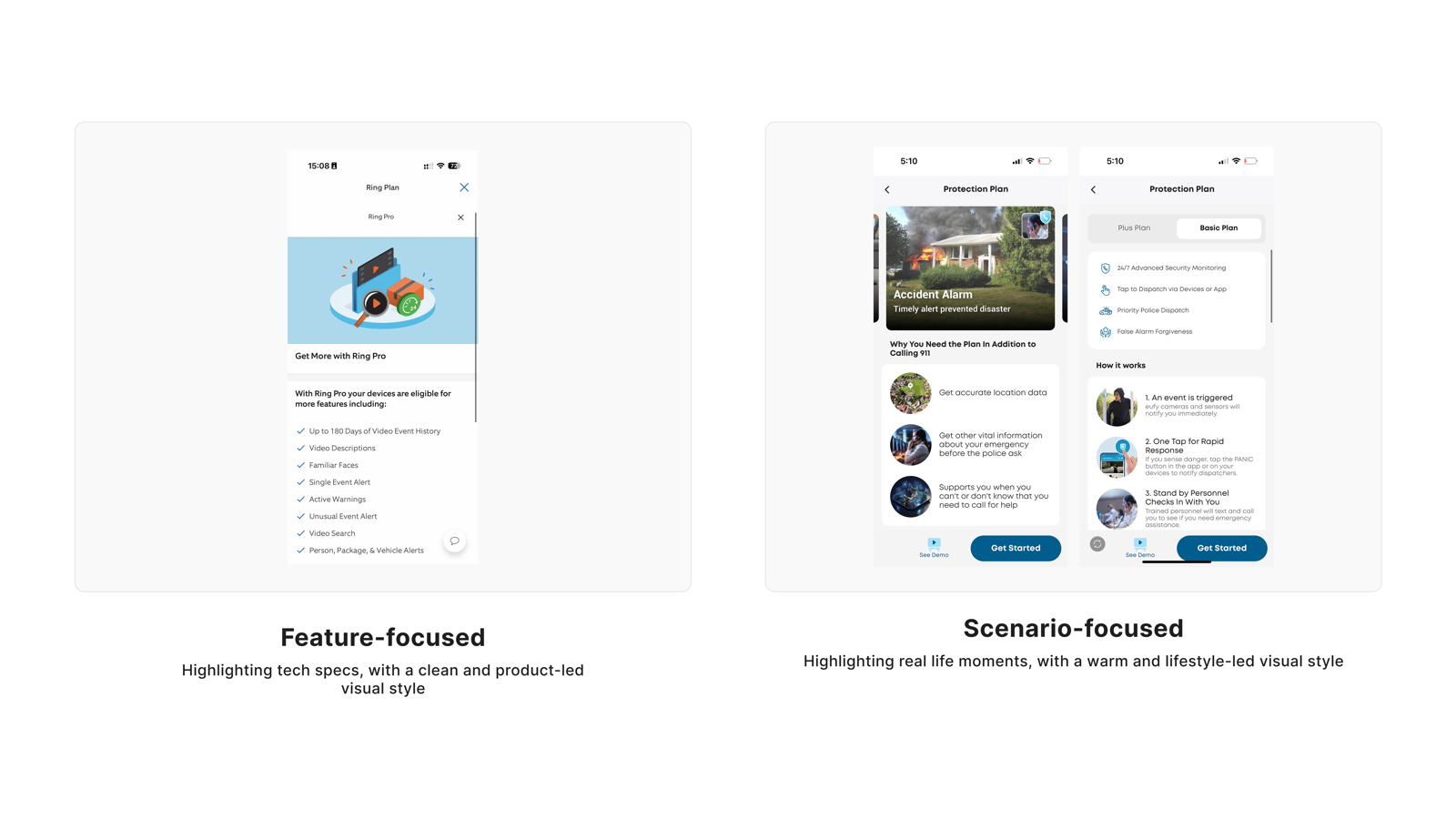
"Like to know the exact features I have vs a scenario that might not apply to me."
Age 25–34Income Under $25,000Sub $10–$19.99V1 cohort
"I'm 100% team features — the number one way to sell me is to show me exactly what's included, because then in my head I feel like I know what I'm getting."
Age 25–34Income Over $100,000Sub $10–$19.99V2 cohort
"The scenarios help me better see why the product may be of use to me."
Age 45–54Income $100,000–$149,999Sub Under $10V1 cohort
"It feels more relatable and helps me picture how the product would fit into real everyday life."
Age 25–34Income Over $100,000Sub $20–$29.99V2 cohort
"A mix of both is best — one helps showcase while the other gives more feature details."
Age 18–24Income $100,000–$149,999Sub $10–$19.99V2 cohort
"I prefer scenario-focused because it shows real-life use cases and makes the value of the security features clearer."
Age 25–34Income $50,000–$74,999V1 cohort
"Feature focused is better — I don't need to imagine scenarios."
Age 18–24Income $50,000–$74,999V1 cohort
"I like both but strongly prefer scenario focused because it makes it easier to imagine how it would directly help my life."
Age 35–44Income $25,000–$49,999Sub Under $10V1 cohort
Visual Stimulus
User Perspective
Users who prefer Feature lists value
- Knowing exactly what they're buying — a transparent checklist provides security
- They'll apply features to their own scenarios; they don't need guided narratives
- Scanning a feature list is faster than reading scenario narratives — efficiency first
- (More common among ages 25–34, tech-familiar users)
Users who prefer Scenario examples value
- Ability to connect abstract features to real moments in their own lives
- Scenarios make feature value tangible, building the sense of relevance
- Understanding product value first makes the subscription decision easier
- (More common among ages 35+, users who need more context)
Researcher's Synthesis
Consistency across cohorts: Both cohorts show a near-even split between feature-focused and scenario-focused preferences.
Key Finding: There is no single "correct" approach. Feature-focused advocates want to know exactly what is included, valuing clarity, control, and avoiding manipulation. Scenario-focused advocates value relatability, real-life application, and emotional connection. Both camps are equally passionate, with feature-focused advocates expressing more specific criticisms of scenarios (e.g., "fear mongering," "doesn't apply to me").
Minor difference: Cohort 1's quantitative scale showed a 2:1 preference for scenarios (not reflected in comments), while Cohort 2's slider showed a perfect split (47% vs. 47%). The slider format may have reduced the hypothetical bias toward scenarios, revealing the true split.
Takeaway: The optimal solution may be to offer both: feature-rich details for analytical users, with scenario-based examples to illustrate real-world value.
Tapo Care's Design Response
- Feature items serve as the primary information layer — each subscription tier's specific features are clearly listed
- Scenario examples serve as a secondary layer, supplementing feature points with real-world application value (not a replacement — an enhancement)
- Scenarios and features maintain explicit correspondence — avoid vague one-to-many attribution
- Scenario content covers diverse household contexts (package protection, elderly care, pet monitoring, etc.) to maximize relevance
- Avoid exaggerated or atypical scenarios (home intrusion, etc.) that manufacture fear
Quant support: V1 matrix (n=254) favored Scenario 60.2% / Feature 28.3%; V2 inverse slider (n=38) exact split: Feature 47.4% / Scenario 47.4%. Significant age effect: 35+ favored Scenario 65.6% vs <35 only 52.0% (13.6pp gap). Strong evidence supporting a both-and strategy; primary/secondary structure pending v1 behavioral data validation.
Principle
Visuals help users build initial engagement; text serves rational judgment on demand — these are the same information need at different stages of the user journey.
This dimension forms a triangle with Need 4 (Simple/Detailed) and Need 5 (Feature/Scenario) — all three point to the same meta-pattern: users need visuals/simplicity at the scanning layer, and text/detail at the deep-dive layer. The V2 50/50 split doesn't mean users are indifferent; it means both layers are genuine needs.
Quantitative Distribution
User Voices
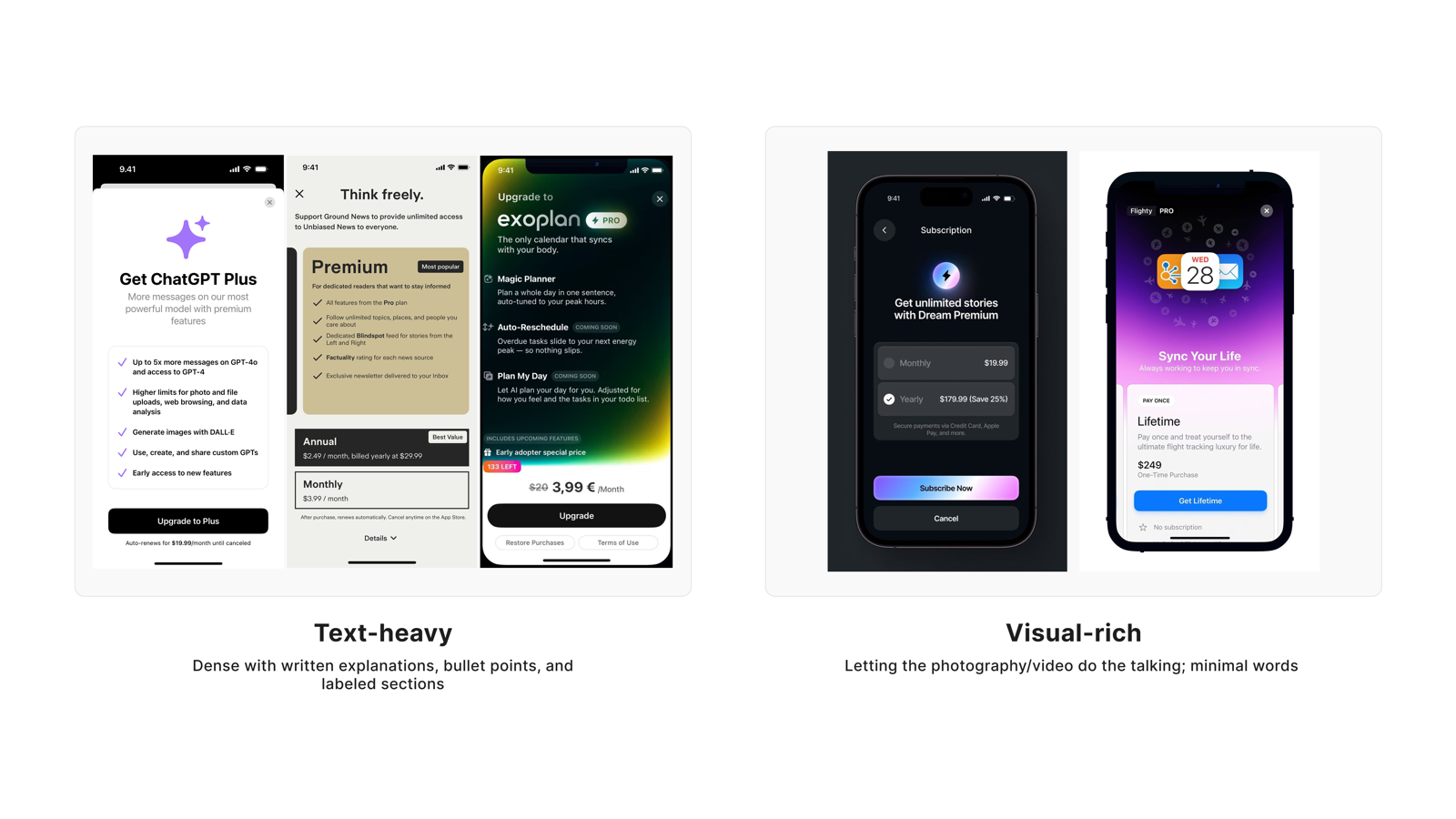
"I like the visual rich side way better — too much information makes people zone out."
Age 18–24Income Under $25,000Sub $10–$19.99V1 cohort
"People tend to quickly lose interest with text-heavy designs even though it is more informative."
Age 18–24Income Under $25,000Sub Under $10V2 cohort
"As much as I enjoy heavy visuals, text and words are better than visuals when it comes to describing a security subscription."
Age 25–34Income $50,000–$74,999V1 cohort
"I don't want too much text before I've decided that I care. Once I care, then I'll take the time to read."
Age 55–64Income $50,000–$74,999Sub Under $10V2 cohort
"I like this one because it clearly outlines what the plan has and does not have."
Age 25–34Income $100,000–$149,999Sub $20–$29.99V1 cohort
"I prefer the text-heavy style because it clearly explains the features and pricing without guessing what's included."
Age 25–34Income $75,000–$99,999Sub $10–$19.99V2 cohort
"I'm split — I think you need to find a balance between text-heavy and visual-heavy."
Age 18–24Income Over $100,000V1 cohort
"Visual-rich is better because most people won't feel like reading constant text. They'll eventually burn out and skim."
Age 25–34Income $25,000–$49,999V1 cohort
Visual Stimulus
User Perspective
Users who prefer Visual-first value
- Don't want heavy text consuming their attention before they've decided whether they're interested
- Visuals help build product understanding quickly, lowering the entry barrier
- High text density causes the brain to disengage — information overload leaves nothing retained
Users who prefer Text detail value
- Security subscription is a rational decision — text communicates more precisely than visuals
- Text makes inclusions and exclusions explicit, reducing ambiguity and guesswork
- Feel confident enough to subscribe only after having complete written information
Researcher's Synthesis
Consistency across cohorts: Both cohorts show a near-even split between text-heavy and visual-rich preferences.
Key Finding: Users have competing needs. Text-heavy advocates value completeness, clarity, transparency, and leaving no room for confusion. Associating text with honesty and informed decision-making. Visual-rich advocates value speed, digestibility, reduced cognitive load, and designs that grab attention without feeling overwhelming.
Minor difference: Cohort 1's quantitative scale showed a clear preference for Visual Rich (64%), while Cohort 2's slider showed a near-perfect split (44% vs. 42%). Similar to Feature vs. Scenario, the slider format may have reduced hypothetical bias.
Takeaway: Neither approach fully satisfies all users. The optimal solution is a balanced approach: visual-rich design for first impressions and engagement, with clear, accessible text details for those who want to dig deeper. Progressive disclosure. Showing key information visually with options to expand for more detail may best serve both camps.
Tapo Care's Design Response
- Above-the-fold uses visual elements (icons, images, color blocks) to build fast comprehension, minimizing above-fold text volume
- Visual-first display; text detail expands on demand (progressive disclosure)
- Icons and imagery carry explicit semantic meaning — each visual element communicates one clear information point, not pure decoration
- Text sections are typeset for readability — appropriate line spacing and font size for fast scanning, avoiding dense paragraph blocks
- Visuals and text have clear hierarchy in the information architecture — neither competes with the other for attention
Quant support: V1 matrix (n=254) favored Visual-rich 63.4% / Text-heavy 26.4%; V2 inverse slider (n=38) exact split: Text-heavy 42.1% / Visual-rich 42.1%. Same pattern as Feature/Scenario dimension. No significant cohort variation; primary/secondary structure pending v1 behavioral data validation.
Principle
Users want a product that feels premium — but not at the cost of information clarity. Abstract handles the visual language; Explicit handles the primary information layer. The two can coexist.
This is the only genuinely "mixed" finding across all 7 dimensions. V1 favored Explicit (58.3%); V2 reversed to Abstract (44.7%), with the highest neutral rate of any dimension. Users have strong aversion to "gamified" or overly stylized design — but remain open to "restrained modern aesthetics."
Quantitative Distribution
User Voices
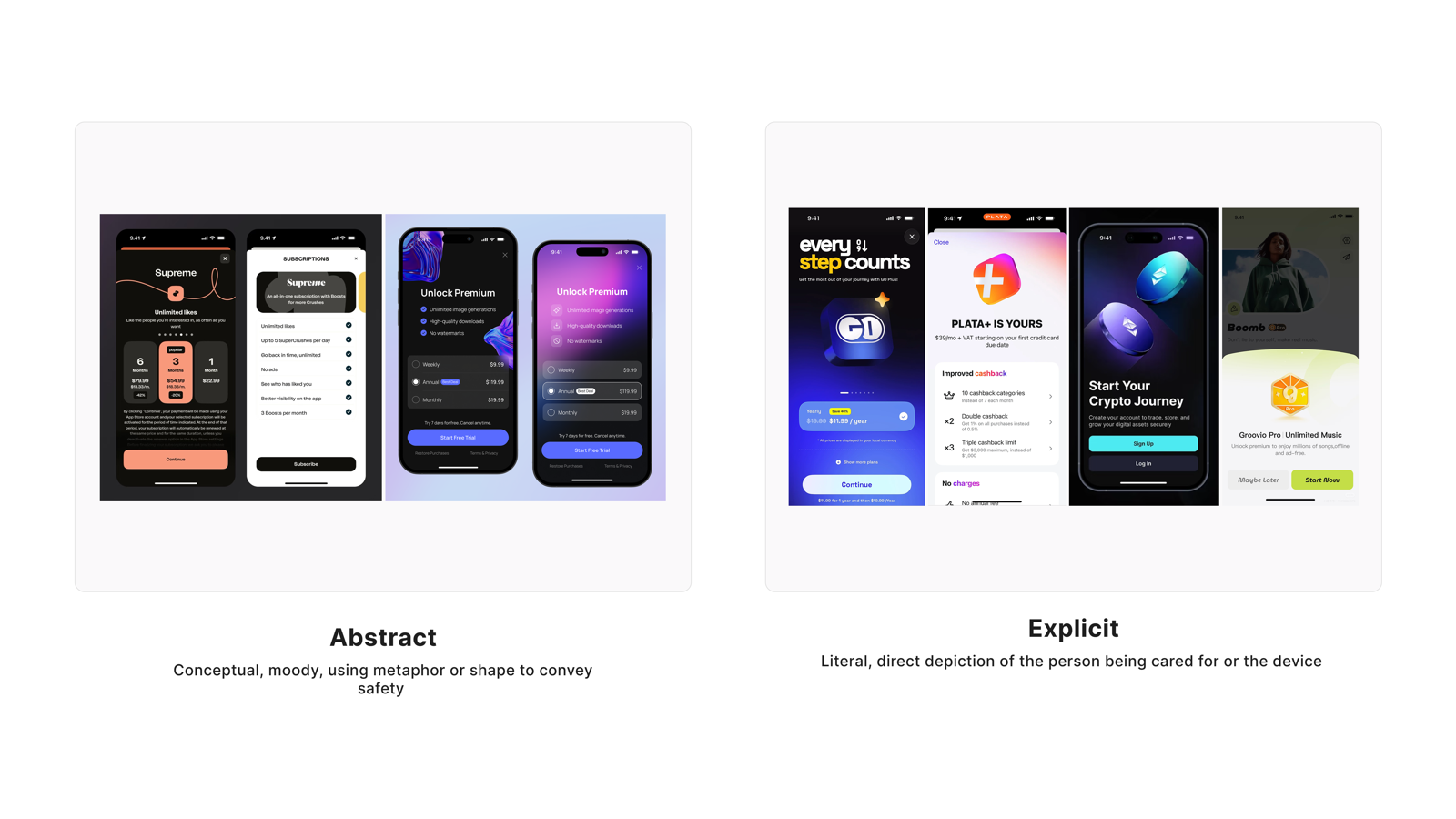
"Rather have a direct message than have to try to find out what they're trying to convey."
Age 45–54Income $25,000–$49,999Sub Under $10V1 cohort
"I prefer explicit because it's not too wordy and it gets to the point of the information needed."
Age 25–34Income $25,000–$49,999V1 cohort
"I would go with Abstract because it looks more premium, modern and gives the app a more polished feel."
Age 25–34Income Over $100,000Sub $20–$29.99V2 cohort
"I definitely prefer the abstract; the ones on the right felt gimmicky."
Age 45–54Income Over $100,000V1 cohort
"Nobody wants to be bombarded with gamey aesthetics when looking for a subscription — this is not a game, it's security."
Age 18–24Income $25,000–$49,999V1 cohort
"I don't know that I fully understand the explicit option so the abstract makes sense."
Age 25–34Income $75,000–$99,999Sub $10–$19.99V1 cohort
"I prefer a more explicit design because it clearly shows what the product does and how it helps in real life situations."
Age 25–34Income $50,000–$74,999V1 cohort
"I feel they are both too busy and hard to read."
Age 45–54Income $75,000–$99,999Sub $10–$19.99V1 cohort
Visual Stimulus
User Perspective
Users who prefer Abstract value
- Modern feel and premium quality — restrained visual language conveys professionalism
- Over-stylized design (gamified, flashy) is inappropriate for a security context
- (More common among higher-income users and those with quality expectations)
Users who prefer Explicit value
- Direct information — no interpretation or guessing required
- In a security context, "being understood" is itself a source of trust
- (More common among older users and those who prioritize practical information)
Researcher's Synthesis
The original research report did not produce a standalone key-finding paragraph for the Abstract vs. Explicit dimension — responses across both cohorts did not converge on a directional conclusion strong enough to support an independent finding. The design response below is derived from the quantitative distribution, user verbatim quotes, and product perspective taken together.
Tapo Care's Design Response
- v1 explores both paths in parallel: Explicit as the primary information layer (clear benefit descriptions), Abstract as the visual language (white space, modern aesthetics, restrained color)
- Action copy is direct and behavioral (e.g., "Subscribe to Basic"); benefit descriptions are specific and quantifiable
- Visual layer stays restrained — white space increases perceived quality; avoid over-decoration
- Avoid gamified or aggressively stylized elements (high-contrast color combinations, badge stacking, animation overload)
- Abstract/Explicit A/B test is included in the v1 follow-up plan, with conversion rate as the primary metric
Quant support: V1 matrix (n=254) favored Explicit 58.3% / Abstract 22.4%, neutral 19.3%; V2 inverse slider (n=38) reversed: Abstract 44.7% / Explicit 36.8%, neutral 18.4%. Highest neutral rate of all 7 dimensions — confirming genuine mixed signal. Significant subscription tier effect: lower tier (<$20) favored Abstract 32.7% vs higher tier ($20+) only 16.0% (16.7pp gap — potential monetization signal).
Cross-Cutting Insights
1. Progressive disclosure is the unified answer across all 7 dimensions
User comments across Need 4 (Simple/Detailed), Need 5 (Feature/Scenario), and Need 6 (Text/Visual) appear, on the surface, to be picking sides between A and B. But reading carefully reveals they're all saying the same thing: give me a lightweight default, and let me find depth when I need it. This is the design logic of progressive disclosure — not a compromise, but a mapping to users' actual mental models. The V2 quantitative data shows 50/50 splits across all three dimensions, further confirming that "users on both ends exist, and design must serve both" is the correct conclusion.
2. Age as a moderator of information density tolerance
Two dimensions show significant age differences: in Simple/Detailed, users 35+ favor Detailed (74.7% vs <35's 59.0%, a 15.7pp gap); in Feature/Scenario, users 35+ favor Scenario (65.6% vs <35 who favor Feature, a 13.6pp gap). Both differences point in the same direction: older users need more contextual information to form a judgment; younger users prefer high-efficiency feature scanning. The design implication is that progressive disclosure's "expand" entry points must be prominent enough for 35+ users — they cannot be buried in corners requiring active searching.
3. Hypothetical bias in quantitative ratings
6 of the 7 dimensions in this study show V1 vs V2 preference direction differences of ≥10pp. The most striking are Intuitive/Emotional (V1 favored Emotional 53.5% → V2 favored Intuitive 68.4%) and Real Photos/Illustrations (V1 favored Illustrations 52.8% → V2 favored Real Photos 65.8%). The matrix presentation format tends to amplify social desirability bias — participants give "idealized" answers rather than true preferences. This is the methodological reason this report prioritizes user verbatim quotes over rating percentages: the language users use to describe their own behavior reflects actual decision logic more faithfully than scale ratings.
Recommendations
| Need / Pattern |
Recommendation |
Owner |
Priority |
Validation |
| Need 1 · Real Photos · Strong consensus |
Use authentic home environment photography as the primary visual; avoid illustrations and AI-generated figures |
UI / Content |
P0 |
Done by research (V2 + qualitative dual confirmation) |
| Need 2 · Intuitive · Strong consensus |
Copy directly describes benefits; remove all fear/anxiety language; subscription and cancellation paths are transparent |
Content / UX |
P0 |
Done by research (strongest V2 reversal, high qualitative alignment) |
| Need 3 · Comparative · Strong consensus |
Subscription plans default to side-by-side comparative layout; differentiation points are explicitly marked |
UX / UI |
P0 |
Done by research (most directionally stable of all 7 dimensions) |
| Need 4 · Simple/Detailed · Medium consensus |
Concise above-fold overview + expandable detail entry points; 35+ user path: detail entry points are prominently placed |
UX / UI |
P0 |
v1 usability test (primary focus: can 35+ users find detail entry points) |
| Need 5 · Feature/Scenario · Split (50/50) |
Feature list as primary layer; scenario examples as secondary layer; explicit correspondence between the two |
Content / UX |
P1 |
v1 behavioral data (click-through rate: feature items vs scenario expand) |
| Need 6 · Text/Visual · Split (50/50) |
Visual-first for initial impression; text detail expands on demand; icons carry explicit semantic meaning |
UI / UX |
P1 |
v1 behavioral data (dwell time: visual zones vs text zones) |
| Need 7 · Abstract/Explicit · Mixed |
v1 explores both paths in parallel: Explicit as primary information layer, Abstract as visual language |
UI / PM |
P1 |
v1 usability test; follow-up standalone A/B (conversion rate as primary metric) |
| Cross-cutting · Progressive disclosure |
v1 adopts progressive disclosure information architecture site-wide, unifying the implementation logic across Needs 4/5/6 |
UX |
P0 |
v1 usability test (n=5–8, focused on validating both-end user paths) |
| Monetization hypothesis |
Abstract aesthetics as a standalone A/B experiment for upgrade-trigger effect on lower-tier users |
PM + Growth |
P2 |
Standalone A/B experiment (upgrade conversion rate as primary metric) |